Ever found yourself scrambling for resources in Minecraft, especially that humble yet essential cobblestone? Whether you're stranded on a Skyblock island with nothing but a tree and a dirt patch, or deep in the End needing to bridge vast chasms, the ability to generate infinite building blocks is a game-changer. This comprehensive guide serves as your Introduction to Cobblestone Generators, taking you from basic concepts to advanced automated setups, ensuring you never run out of materials again.
Forget endless quarrying; it’s time to harness the primal forces of water and lava. We'll demystify these ingenious contraptions, showing you how to build your very own infinite source of stone, cobblestone, and even obsidian.
At a Glance: What You'll Master
- Understanding the Fundamentals: How water and lava interact to create various blocks.
- Building Your First Generator: A simple, early-game friendly design.
- Upgrading for Efficiency: Automated collection with hoppers.
- Scaling Up with Redstone: Piston-powered generators for rapid block production.
- The Ultimate Automation: Crafting fully automatic generators with TNT and complex redstone.
- Troubleshooting Common Issues: Keeping your generator running smoothly.
- Choosing the Right Design: Matching a generator to your needs and resources.
Why an Infinite Cobblestone Supply is Your Minecraft Superpower
Imagine never having to think about mining for your primary building material again. That's the power of a cobblestone generator. It's not just a convenience; it's a strategic advantage, particularly in resource-limited maps like Skyblock, where traditional mining isn't an option. In the End dimension, generators provide a safe and abundant way to gather materials for bridging, allowing you to focus on exploration and combat without constantly worrying about your block count.
The concept is deceptively simple, yet the engineering behind the various designs offers layers of complexity and satisfaction. At its heart, it's about controlling the interaction between water and lava.
The Elemental Dance: How Blocks Are Born
At the core of every cobblestone generator lies a specific interaction between flowing water and lava. Understanding these elemental reactions is the first step to becoming a master builder:
- Obsidian: When flowing water meets still lava, the result is the incredibly tough obsidian block. This is useful for crafting Nether portals and enchantment tables.
- Stone Blocks: If flowing lava touches still water, it solidifies into stone. This interaction is key if you prefer the smoother texture of stone for your builds.
- Cobblestone: The most common outcome, cobblestone is formed when flowing lava and flowing water meet each other simultaneously. This is the foundation for countless builds and crafts.
A quick note on outputs: the type of block you extract from a generator can also depend on your tools. If you mine the generated block with a pickaxe enchanted with Silk Touch, you'll get a stone block (or obsidian, if that's what was generated). Without Silk Touch, and especially with the Fortune enchantment, you'll yield cobblestone.
Your First Steps: The Simple Cobblestone Generator
Every epic journey starts with a single step, and in the world of infinite resources, that step is the simple cobblestone generator. This design is the bedrock (pun intended) for survival, especially in early-game scenarios or on Skyblock maps where resources are scarce. It’s incredibly easy to build and requires minimal materials.
Purpose & Promise
This generator is your go-to for immediate cobblestone needs. It's efficient in terms of resources used to build it, making it perfect for when you literally have only a few items to your name. While it requires manual mining, it guarantees a continuous supply.
What You'll Need
- 1 Bucket of Water (or an Ice Block)
- 1 Bucket of Lava
- Any solid blocks for shaping
The Build: A Step-by-Step Guide
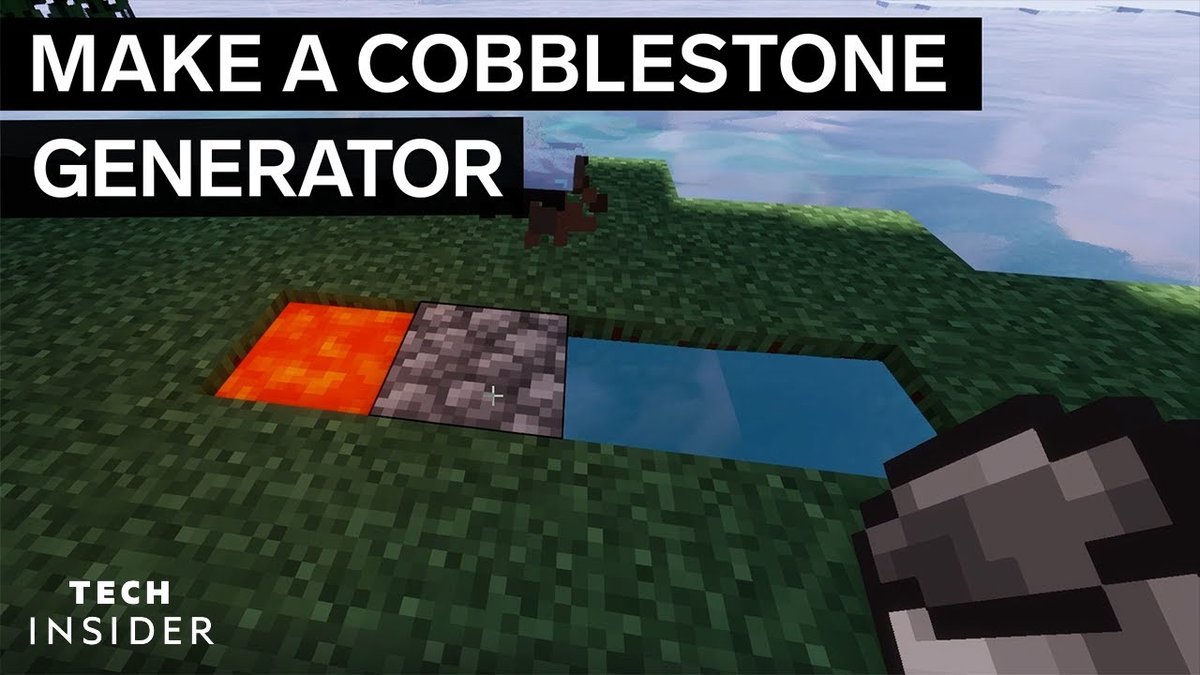
- Dig the Trench: Start by digging a 4-block long, 1-block wide, and 1-block deep trench in the ground.
[ ] [ ] [ ] [ ] - Create the Void: Break the second block from one end of your trench. This creates a small pit.
[ ] [X] [ ] [ ] <- 'X' is the broken block - Place the Water Source: Go to the end of the trench closer to the broken block. Place your water bucket there. The water will flow into the broken block's space and stop.
[W] [~] [ ] [ ] <- 'W' is water source, '~' is flowing water - Introduce the Lava: Now, go to the opposite end of the trench (the one furthest from the water source). Place your lava bucket there. The lava will flow towards the water.
[W] [~] [L] [ ] <- 'L' is lava source - Witness the Magic: The flowing lava and flowing water will meet precisely in the space where the water stopped. This interaction will instantly generate a cobblestone block.
When you break this cobblestone block with your pickaxe, a new one will generate almost immediately in its place. You've now created an infinite source!
This basic design is the foundation. It teaches you the core principle, and from here, we can start adding layers of complexity and automation. Learn about cobble generators in more detail to expand your building repertoire.
Leveling Up: Cobblestone Generators with Hopper Collection
While the simple generator is fantastic for getting started, it has one minor drawback: sometimes, when you break a block, the item might fall into the lava and be destroyed. To solve this, we introduce hoppers – the unsung heroes of Minecraft automation. A cobblestone generator with hopper collection dramatically improves efficiency by ensuring every single generated block is safely collected.
Purpose & Promise
This design is about eliminating loss. By automatically funneling generated blocks into chests, you can mine rapidly without worrying about item despawn or destruction. It's perfect for when you need a large, continuous supply of cobblestone without constantly stopping to pick up items.
What You'll Need
- 1-2 Water Buckets
- 1 Lava Bucket
- Hoppers
- Chests
- Solid Blocks (non-flammable preferred, especially near lava)
- Optional: Stairs (for efficient water flow control), Signs (to manage water/lava)
The Build: A Common Design Idea
There are many variations, but a common and effective setup involves directing the water flow to push items towards a collection point.
- Prepare the Collection System: Start by placing your chests. These will store your cobblestone. Behind or below them, connect hoppers. Hoppers will funnel items into the chests.
[C] [C] <- Chests
| |
[H] [H] <- Hoppers - Create the Generation Chamber: Above the hoppers, you need to set up the water and lava interaction.
- Water Flow: Construct a small channel leading to the generation point. You can use stairs placed upside down to create a "half-block" space for water, allowing items to fall through while controlling water flow.
- Lava Placement: Place your lava bucket so it flows into the generation point, interacting with the water. The water flow should push the newly generated cobblestone towards the hoppers.
Example Diagram (Top-Down View):
S S S S
S W ~ ~ G
S L ~ ~ H
S S S S S: Solid BlockW: Water SourceL: Lava Source~: Flowing Water/LavaG: Generation Point (where cobblestone forms)H: Hopper belowG- Note: The water source (W) would be set up so the flow directs items over the hopper. The lava (L) meets the water flow at G.
- Refining the Flow with Stairs: Place stairs (e.g., stone bricks, cobblestone stairs) around the generation point. The water will flow over the top of the stairs, but items will be able to fall down through the space underneath the stairs and into the hoppers below. This is a very neat trick for item collection.
By funneling your output directly into chests, you're free to mine as much as you want without interruption, making this a significant upgrade in terms of convenience and raw material gathering efficiency.
Boosting Output: Piston-Based Stone/Cobblestone Generators
When manual mining can't keep up with your demand, it's time to bring in the big guns: redstone and pistons. Piston-based generators are designed to produce blocks at a much faster rate, often exceeding what a player can mine manually, and push them towards a collection point or directly to you. This is where you truly start to automate the production line.
Purpose & Promise
This design generates blocks rapidly and pushes them into a line, making them easily minable in bulk. It's ideal for mid-to-late game when you have access to redstone components and need vast quantities of materials for large-scale projects. You can easily generate either stone or cobblestone with this method.
What You'll Need
- Normal Pistons (not sticky pistons for this type of basic pushing)
- Redstone Dust
- Redstone Repeaters
- A Lever (or other redstone input)
- Water Buckets
- Lava Buckets
- Non-flammable Solid Blocks (e.g., stone, cobblestone, obsidian)
The Mechanism: Redstone Power and Precise Timing
The core idea is to use redstone to activate pistons that push newly generated blocks. Repeaters are crucial for introducing delays, ensuring that a block forms before a piston attempts to push it.
- The Generation Point: Set up your water and lava sources to generate a block directly in front of a piston.
- For Stone, ensure flowing lava touches still water.
- For Cobblestone, ensure flowing lava and flowing water meet.
- Piston Placement: Place a series of normal pistons facing the direction you want the blocks to be pushed. The first piston sits directly behind the block generation point.
- Redstone Clock: You'll need a redstone clock (a circuit that repeatedly turns on and off) to power the pistons. A simple, common clock involves redstone repeaters configured in a loop.
- Example Setup: Place three redstone dust in a line. Place a repeater facing into the middle dust. Place another repeater facing out from the middle dust to complete a loop. Set all repeaters to the maximum delay (right-click three times).
- Connect this clock to your pistons via redstone dust.
- Activating the System: A lever connected to your redstone clock will turn the system on and off. When activated, the clock will cycle, causing the pistons to extend and retract, pushing the generated blocks forward.
L -- [R>][R>][R>] -- PISTON -- [G] (Block forms here)
L: LeverR>: Redstone Repeater (set to delay)Piston: Normal PistonG: Generation point
Operation and Control
- To Start: Flip the lever to activate the redstone clock. Blocks will start forming and being pushed.
- To Stop: Flip the lever again. The redstone clock will deactivate, and the pistons will stop.
- Troubleshooting a Jam: If the pistons stop pushing, it might be due to a timing issue or a limit being reached.
- To reset a stubborn clock, break one piece of redstone dust, wait a moment, replace it, then quickly double-click the lever to re-engage the clock. This often "kickstarts" the cycle.
This design introduces you to the power of redstone automation. While it takes more resources and a bit of careful setup, the increased output is well worth the effort for any serious builder.
The Ultimate Machine: Fully Automated Cobblestone Generators
For the truly ambitious, the fully automated cobblestone generator is the pinnacle of Minecraft engineering. These intricate contraptions not only generate blocks at breakneck speeds but also automatically destroy them and collect the resulting items, all without any player intervention. This is late-game material, requiring a significant investment in resources and a solid understanding of redstone mechanics.
Purpose & Promise
This generator offers unparalleled efficiency and convenience. It's a "set it and forget it" solution for vast quantities of cobblestone, ideal for massive building projects, trading hall restocks, or simply boasting about your redstone prowess. It produces, destroys, and collects, providing a truly infinite and hands-off supply.
What You'll Need (An Extensive List!)
Be prepared; this isn't for the faint of heart. You'll need:
- Water Buckets, Lava Buckets
- Leaves (non-flammable block often used for aesthetics/spacing)
- Sticky Pistons, Normal Pistons
- Target Blocks (or other non-flammable blocks)
- Observers
- Redstone Blocks
- Redstone Comparators, Redstone Repeaters
- Slime Blocks (for flying machines/TNT dupers)
- TNT
- Fence, Dead Coral Fan (for TNT duper)
- Detector Rail, Minecart, Fence Gates (for TNT duper)
- Redstone Dust, Solid Blocks (various)
- Obsidian (for blast resistance)
- Levers, Slabs
- Chests, Hoppers, Stairs (for collection)
The Mechanism: A Symphony of Redstone, Pistons, and TNT
Fully automated generators combine several complex redstone modules:
- Block Generation & Pushing:
- Similar to the piston generator, water and lava create blocks.
- Observers detect the newly formed block.
- This observer signal triggers sticky pistons to pull the block down or away, then regular pistons to push the generated blocks forward into a long line.
- TNT Duper Integration:
- The most impressive component is often a TNT duper. This clever contraption allows you to duplicate a single piece of TNT, providing an infinite supply of explosives.
- The duper is typically built using sticky pistons, slime blocks, a fence, a dead coral fan, and a minecart on a detector rail. It's designed to release primed TNT at specific intervals without consuming the original block.
- Etho Hopper Clock (Timing the Blasts):
- A sophisticated redstone clock, often an Etho hopper clock, is used to precisely time the release of TNT. This ensures that the TNT explodes just as a sufficient number of blocks have been pushed into position, maximizing efficiency and minimizing item loss.
- Water-Based Collection System:
- After the blocks are blasted by TNT, the resulting cobblestone (or stone) items are scattered. A flowing water stream is used to channel these items to a central collection point.
- This stream leads directly into a series of hoppers, which then funnel all the collected items into a bank of chests.
Critical Operational Insights
- Piston Limit: Pistons cannot push more than 13 blocks. Your automated generator must have a system to stop before this limit is reached. Typically, a lever is included to deactivate the pushing mechanism. Neglecting this will cause jams and potentially break your machine.
- Lava Maintenance: Occasionally, generated blocks or blast fragments might delete the lava source block. Keep an eye on your generator, and be prepared to replace the lava if production stops.
- Deactivation Protocol: Always deactivate the pushing mechanism (via a lever) before the pistons reach their 13-block push limit. This prevents jams and ensures smooth restarts.
- Obsidian Protection: Use obsidian strategically around the TNT duper and blast chamber to prevent parts of your generator from being destroyed by the explosions.
Building a fully automated generator is a challenging but incredibly rewarding experience, showcasing the true potential of Minecraft's mechanics.
Common Pitfalls & Troubleshooting Your Cobblestone Generator
Even the most seasoned builders encounter issues. Knowing how to diagnose and fix problems can save you hours of frustration. Here are some common snags and how to troubleshoot them:
Piston Limitations: The 13-Block Rule
This is paramount: Pistons (both normal and sticky) cannot push more than 13 blocks at once. They also cannot push blocks like bedrock, obsidian, chests, signs, or dispensers. If your piston-based or automated generator grinds to a halt, check if the piston line has reached its limit. Build a stopping mechanism or integrate a TNT duper to destroy blocks before they hit this cap.
Jams and Malfunctions
- Redstone Circuits: For piston-based generators, ensure your redstone signals are circulating correctly. Check for broken dust, improperly placed repeaters, or power fluctuations.
- Water Containers: In fully automated or hopper-collection systems, ensure your water streams are clear. Blockages (e.g., from generated blocks or random entity drops) can prevent items from reaching hoppers or even stop water flow needed for generation.
- Mining Speed: In manual generators, mining too quickly can sometimes cause blocks to fall into the lava or desync with generation, though this is less common with well-designed simple generators.
- Water Source Blockage: In piston generators, never cover the water source block. This can disrupt the water flow and cause generation to stop or become intermittent. Ensure the source block always has space above it.
Protection from Lava Breaks
Lava can be destructive. If you have redstone components or other vulnerable blocks near lava, they can be destroyed. Place signs in redstone circuits (or anywhere vulnerable). Pistons cannot push signs, and signs are non-flammable, making them excellent protective barriers against lava flow.
Running Check: Listen Closely
A simple but effective tip: listen for piston sounds. If your automated or piston-based generator is supposed to be running but you hear no piston activation, it's a clear sign that the redstone clock or power supply has failed.
Efficiency: It's Not Always 100%
- Simple Generators: These are generally not 100% efficient due to the occasional block loss into lava. They prioritize ease of build over perfect item retention.
- Hopper-Based Generators: Significantly improve efficiency by minimizing loss. They're a solid middle ground.
- Piston-Based & Fully Automated: These designs generally offer the highest reliability and efficiency, especially when combined with collection systems, because they manage the blocks post-generation more effectively.
By keeping these troubleshooting tips in mind, you'll be able to quickly diagnose and fix most issues, ensuring your infinite resource supply remains truly infinite.
Choosing Your Generator: A Quick Guide
With several designs available, how do you decide which one is right for you? It boils down to your current game stage, available resources, and desired output.
| Feature | Simple Cobblestone Generator | Hopper Collection Generator | Piston-Based Generator | Fully Automated Generator |
|---|---|---|---|---|
| Complexity | Very Low (Basic interaction) | Low (Adds hoppers/chests) | Medium (Introduces Redstone/Pistons) | High (Complex Redstone, TNT Duper, Observers) |
| Resource Cost | Very Low (2 buckets, few blocks) | Low (2 buckets, hoppers, chests, blocks) | Medium (Redstone, pistons, repeaters, 2 buckets, blocks) | Very High (Extensive Redstone, TNT, slime, observers, etc.) |
| Output Rate | Manual mining speed (limited by player) | Manual mining speed (items collected automatically) | Fast (Automated block generation and pushing) | Extremely Fast (Automated generation, destruction, collection) |
| Effort to Use | High (Requires constant mining) | Medium (Mining required, but items collected) | Low (Activate and mine pushed blocks) | Very Low (Set it and forget it) |
| Ideal For | Early game, Skyblock start, basic needs | Early-mid game, extended manual mining, avoiding item loss | Mid-late game, large builds, rapid block supply | Late game, massive projects, ultimate automation, "AFK farming" |
| Maintenance | Very Low | Low | Medium (Monitor redstone/piston limits) | High (Monitor lava, TNT duper, block limits) |
Your Next Infinite Source Awaits
From a humble hole in the ground to a roaring engine of automated production, the journey through cobblestone generators is a testament to Minecraft's depth and your own ingenuity. You now have the knowledge to create an endless supply of the most fundamental building blocks, freeing you to focus on grander designs, epic adventures, and innovative contraptions.
Whether you're just starting your first Skyblock adventure or aiming to build a monumental fortress, a reliable cobblestone generator is an indispensable tool in your arsenal. Choose the design that fits your current needs, gather your materials, and start building your infinite source today. The blocks, and the possibilities, are truly endless.